
Catch up on the latest improvements around the Resort, see where the fiber crews are headed next, and read Hey Vinny’s take on how to make the new Digital Directory even better.

Your Weekly Resident Newsletter from Venture Out at Mesa
Published on Oct. 17, 2025
Your Weekly Newsletter
Fiber Optic Project Update
The fiber installation crews are moving at a fast pace and will begin asphalt street repairs next week. Please note that Aztec Street will be closed to all traffic in both directions on the following days:
- Mon., Oct. 20 – 400 Block
- Tues., Oct. 21 – 300 Block
- Wed., Oct. 22 – 200 Block
- Thurs., Oct. 23 – 100 Block
Thank you for your patience as crews complete this work and restore the streets as quickly as possible.
Community Projects Updates
Fall projects are in full swing across the Resort! Here’s what’s happening around the community:
- Bocce Ball Courts – Work is underway and expected to be complete by late October.
- Tennis Courts – Are nearly finished.
- Pickleball Lights – Installation is on schedule. Courts 10 & 11 should be ready for evening play this weekend.
- Solar Lights – Work will resume soon. Crews paused installation so the fiber optic team could stay ahead and avoid overlapping in the same areas.
- Overseeding – The grass areas have been fully overseeded, and you’ll start seeing fresh green growth soon.
- Fall Flowers – Planting begins next week! If you enjoy this type of work, contact the Admin Office to add your name to the volunteer list.
- Perimeter Landscaping – Cleanup and new plantings along the perimeter walls will begin in late October.
- Woodshop Roof – Repairs from last spring’s storm damage have been completed.
- West Pool Heater – A technician from the manufacturer visited last Friday to make necessary adjustments, and thanks to Steve’s coordination, the heater is now working properly and producing hot water again.
Patrol Appointment Reminder
A quick reminder to please use the app we’ve set up to schedule appointments with Patrol. This system has greatly reduced wait times and helped minimize the number of residents waiting in the lobby.
Scheduling your visit in advance ensures a smoother experience for everyone, thank you for helping make this process work so well! You can easily schedule your appointment from the Patrol web page, click here.
Letters from Hey Vinny!
Hey Vinny!
Shouldn’t it be common sense that a shirt is required while in the Bistro at all times?
I’m pretty offended when sitting in a place where food is served, that some feel they don’t need to wear a shirt, whether it is meal time or not.
Sincerely,
Naught Luking
Hey there, Neighbor,
You’re absolutely right! Shirts are a must in the Bistro (and anywhere indoors here at VO). We don’t need the Yeti showing up on his lunch break and scaring off everyone’s appetite!
Let’s keep it classy and comfortable for everyone: no one should be inside any VO building without shirts and shoes. Thanks for speaking up and helping keep our community respectful and welcoming, even for us desert coyotes who shed a bit this time of year.
Hey Vinny!
The new website is A+. Thank you for the remake and modernization of our website.
I am, however, struggling with the digital directory.
Will the surnames be changed to be listed in alphabetical order?
Will there be a listing by street and house number in the future? (You know us gently aged may not always remember a name, but we may remember where the person we need to contact lives.
And why can we not list our spouse/ partner/housemate on the line provided? It wouldn’t save it for me.
Sincerely,
Ty P. King
Hey Friend,
Aw, shucks, thanks for the kind words about the new website! I’ll pass that along to the ol’ buffalo who made it happen, he’s been working harder than a javelina digging for cactus roots.
Now about that Digital Directory, you’ve brought up some great questions!
- Alphabetical by last name? That’s a fantastic suggestion, and we’ll see what can be done to make it happen. In the meantime, you can still search anyone by last name using the search bar (See image below).
- Street listings? You can already search by street name or number, it just depends on whether your neighbors have updated their profiles to include their addresses. We’ve got around 1,000 entries so far in the Digital Directory, but we’d love to see about 700 more to make the directory truly complete
The trick is, you have to hit SEARCH. The results won’t appear with that SEARCH button gettin’ hit (See image below).
- Spouse/partner/housemate info? If it didn’t save for you, give it another try and make sure you scroll all the way to the bottom of your profile and click “SAVE CHANGES“. If that doesn’t work, drop a note to the Admin Office so they can make sure your info is showing correctly.
Keep those paws tapping and your profile updated, neighbor, every little bit helps the pack stay connected!
Your pal, Vinny 🐾
Searching for Users in the Digital Directory
Step 1: Click Sign In in the top right corner of ventureoutmesa.com.
Step 2: Click on Resident Network in the main navigation under RESIDENTS.
Step 3: Click on the DIGITAL DIRECTORY button at the top of the network page.
Step 4: Use the search filter to search by first name, last name, street number, street name, or someone’s partner/roommate’s name.
Step 5: HIT SEARCH.
If you are making multiple searches, hit “reset” above the search button after each one.
Please note: Only current property owners will be allowed to log in to the website. We are still processing Website Access Request forms (form below under Quick Reminders – Signing in – website). Each profile must use a separate email address. We see couples trying to sign up with the same email and we cannot create those accounts. Each use must have a unique email address.
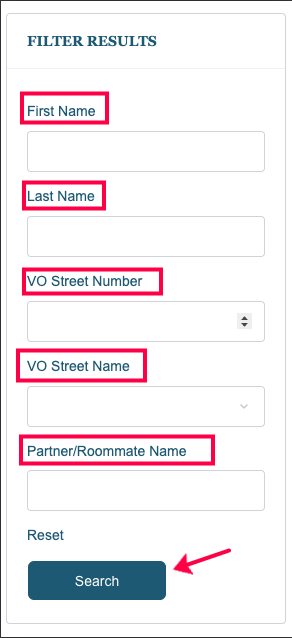
Image above is of the SEARCH FILTER on the Digital Directory page.
Quick Reminders
Signing In - Website
Only current Venture Out property owners can log in to the community website. Renters and non-property owners do not have access.
If you’re a property owner and unable to log in, please complete the Website Access Request form. Once your ownership is verified, you’ll receive instructions on how to create your password and access your account.
Club and Group Updates
Our new website has a Clubs and Groups hub features individual pages for each Club and sections for each Group to share information, announcements, times, dates, locations, and more. If you are an authorized Club or Group rep, you can update your Club or Group’s section. Learn more by reading this article: How to updated Clubs and Groups.
Resident Network and Digital Directory
VO property owners can sign in at ventureoutmesa.com to access our new Resident Network and Digital Directory. Once logged in, you can update your Digital Directory profile, share photos, and connect with others using features similar to Facebook. Read more about how to update your profile picture and other features in our Support Articles.
Website VS HOA Portal
The Venture Out website and HOA Portal are separate websites. To learn more about them, please read this article.
Website Support
Make the most of your VO website experience by checking out our Support Articles.
Read Support Articles